3 Sims 4 Child Hair Conversions | Kids, Toddler & Infant Hair
Looking for more Sims 4 child hair conversions? 💗 This roundup includes three conversion collections by DisruptiveTrait, bringing hairstyles originally associated with Daylife Sims, ImVikai, and Wotunciba to younger Sim age groups.
The downloads include Daylife Sims adult-to-child hair conversions, an ImVikai adult-to-child, toddler, and infant hair conversion, and Wotunciba adult-to-child hair conversions.
Hair conversions are especially useful if you want siblings, parents, and younger Sims to have similar hairstyles instead of being limited to the smaller selection made specifically for children, toddlers, and infants.
💗 Daylife Sims Adult to Child Hair Conversions
The first download is a collection of Daylife Sims adult-to-child hair conversions by DisruptiveTrait.
The title specifically identifies these as adult hairs converted for child Sims. That means the purpose of the download is to make hairstyles originally available for older Sims usable on the child age group.
Since the supplied title does not state the exact number of converted hairstyles, I am keeping the description broad instead of assigning an item count that was not provided.
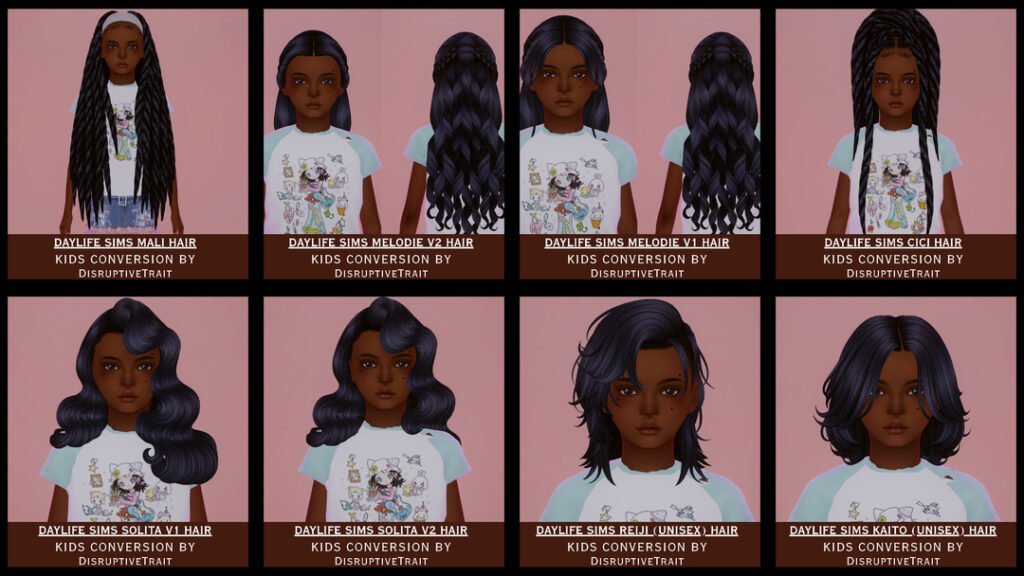
💗 View Daylife Sims Child Hair Conversions
🌸 ImVikai Adult to Child, Toddler & Infant Hair Conversion
The ImVikai hair conversion is the most age-inclusive download in this roundup because the creator title specifically lists child, toddler, and infant versions.
That makes this collection especially useful for family gameplay. Instead of having a hairstyle available only for older Sims, converted versions can give younger age groups matching or similar hair options.
The supplied preview image is labeled Ashle Hair Toddler/Child, while the Patreon post title indicates that the overall conversion release covers child, toddler, and infant age groups.
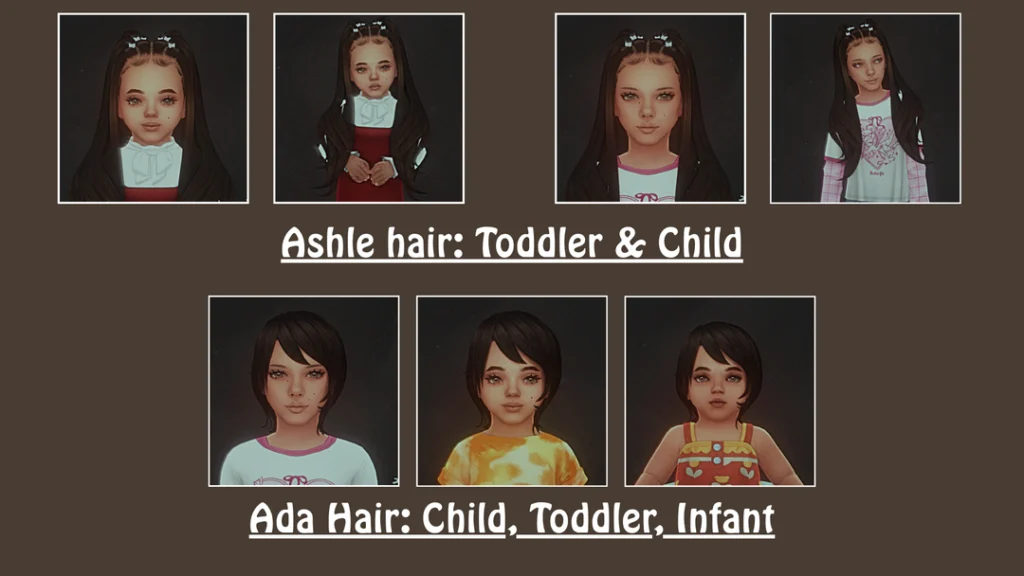
💗 View ImVikai Hair Conversions
✨ Wotunciba Adult to Child Hair Conversions
The third download features Wotunciba adult-to-child hair conversions by DisruptiveTrait.
Like the Daylife Sims collection above, this release specifically focuses on taking hairstyles made for older Sims and making them available for child Sims.
If you already use Wotunciba hairstyles for teen or adult Sims, this kind of conversion can help keep a similar hair aesthetic across different generations in the same household.
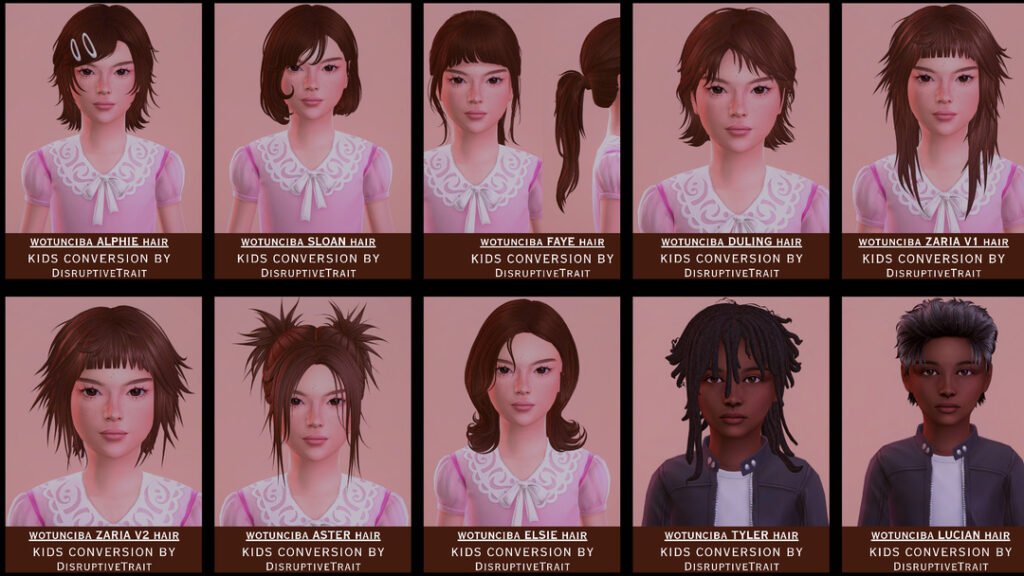
💗 View Wotunciba Child Hair Conversions
📦 What You’re Downloading
This roundup contains 3 separate hair-conversion download pages.
The Daylife Sims and Wotunciba releases are specifically labeled as adult-to-child conversions. The ImVikai collection goes further by listing child, toddler, and infant conversions in the creator title.
These are conversion collections rather than three individual hairstyle files, so each creator page may contain multiple package files or different age versions.
The supplied information does not confirm the exact number of hairs, swatches, hat compatibility, or whether every conversion requires an original mesh, so those details should be checked on the creator pages.
👧 Why Use Child Hair Conversions?
Hair conversions give younger Sims access to styles that were originally created for older age groups. This can make Create-A-Sim feel much less repetitive, especially if you play large families, legacy saves, or households with several generations.
They can also make it easier to create family resemblance. For example, a child Sim can wear a converted version of a hairstyle similar to one used by a parent or older sibling.
The ImVikai conversion is especially helpful for this because the release covers several younger age groups rather than child Sims alone.
📁 How to Organize Hair Conversions
If you download a lot of converted hair, I recommend keeping a main folder called Kids Hair Conversions.
Inside that folder, you could create separate folders for Daylife Sims, ImVikai, and Wotunciba. For the ImVikai download, you could separate child, toddler, and infant files further if the package names make those age groups clear.
Keep the original creator and conversion names in the package filenames whenever possible. That makes it much easier to identify the source if you ever need to replace or remove a hair.
How to Install Sims 4 Hair Conversions
Download the conversion you want from the Patreon page and extract the file first if it comes inside a ZIP or RAR archive.
Move the included .package files into:
Documents → Electronic Arts → The Sims 4 → Mods
Then open The Sims 4 and go to Game Options → Other. Make sure Enable Custom Content and Mods is turned on, then restart your game.
⚠️ Important Hair Conversion Reminder
Conversions can sometimes depend on an original hairstyle or mesh, while others may be completely standalone. The supplied titles do not confirm those requirements for every hair included here.
If a converted hairstyle does not appear correctly in Create-A-Sim, check the DisruptiveTrait Patreon post for that specific conversion before deleting files.
Also make sure you are looking under the correct Sim age group. A child conversion will not necessarily appear for toddlers or infants unless those versions are specifically included.
💖 You May Also Like
Sims 4 Kids Hair CC
|
Sims 4 Child Hair CC
|
Sims 4 Toddler Hair CC
|
Sims 4 Infant Hair CC
✨ Keep Browsing
More Hair Conversions
|
Kids Braids CC
|
More Kids CC
|
Browse Sims4Kids